Invideo has launched AI 4.0 with voice cloning capabilities and enhanced editing features that make video creation even more intuitive.
Invideo has these plans:
Free Plan: $0/month, 10 video minutes, and 1 AI credit per week
Plus Plan: $28/month, 10 credits, 50 video minutes + 95 iStock (billed $336 yearly)
Max Plan: $50/month, 40 credits, 200 video minutes + 320 iStock (billed $600 yearly)
Generative Plan: $100/month, 100 credits, 200 video minutes + 320 iStock (billed $1200 yearly)
Team Plan: $899/month, 1000 credits, 2000 video minutes + 3200 iStock (billed $10788 yearly)
Enterprise Plan: Custom pricing, custom solutions for large organizations
Many users wonder why Invideo AI is so expensive compared to other tools. The answer lies in their comprehensive template library, advanced AI features, and unlimited export capabilities that justify the AI video pricing.
For a 1-minute video using the Plus Plan:
Monthly subscription: $28
50 video minutes + 95 iStock items per month
Full HD resolution included
Voice cloning is available on the Max plan
How much does AI video cost per minute: $28 (unlimited usage)
Total cost for a 1-minute video: $28/month
This allows for multiple videos within the unlimited exports per month. The more videos you create, the lower your cost per video becomes. The Max plan, at $50/month for heavy users, might be more cost-effective with advanced features like voice cloning.
Pictory.ai

Pictory has enhanced its AI voice options and introduced additional customization features for improved brand consistency.
Starter Plan: $19/month, 200 video minutes, 2 million royalty-free videos (originally $25/month, billed annually)
Professional Plan: $29/month, 600 video minutes, 18 million videos from Getty Images and Storyblocks (originally $49/month, billed annually)
Team Plan: $99/month, 1800 video minutes, 18 million videos from Getty Images and Storyblocks (originally $119/month, billed annually)
Enterprise Plan: Custom pricing, custom minutes, unlimited brand kits
For a 1-minute video using the Plus Plan:
Monthly subscription: $28
50 video minutes + 95 iStock items per month
Full HD resolution included
Voice cloning is available on the Max plan
How much does AI video cost per minute: $28 (unlimited usage)
Total cost for a 1-minute video: $28/month
This allows for multiple videos within the unlimited exports per month. The more videos you create, the lower your cost per video becomes. The Max plan, at $50/month for heavy users, might be more cost-effective with advanced features like voice cloning.
Crayo.ai

Crayo.ai has refined its platform with enhanced templates and improved generation times.
Hobby Plan: $19/month, 50 AI videos per month, 40 minutes of export
Clipper Plan: $39/month, 150 AI videos per month, 2 hours of export
Pro Plan: $79/month, 250 AI videos per month, 3 hours of export
For a 1-minute video using the Hobby Plan:
Monthly subscription: $19
40 minutes of export
There is no extra charge for script generation or voiceover
AI video cost per minute: $0.475 (when using full allowance)
Total cost for a 1-minute video: $19/month
It allows for multiple videos within the 40-minute monthly export limit. Like the other tools, the cost per video decreases with higher usage. If you use all 40 minutes, your cost per video could be as low as $0.475 per minute of content.
FlexClip AI

FlexClip AI has emerged as a budget-friendly option with surprisingly robust features and an intuitive interface.
Free Plan: $0/month, 720p HD downloads, maximum 12 projects, video length up to 10 mins
Plus Plan: $11.99/month, 1080p Full-HD downloads, 3,600 AI credits/year (originally $19.99/month, billed annually)
Business Plan: $19.99/month, 4K Ultra HD downloads, 9,600 AI credits/year (originally $29.99/month, billed annually)
For a 1-minute video using the Plus Plan:
Monthly subscription: $11.99
60 video exports per month
1080p resolution included
No watermark on exported videos
How much does it cost to make AI videos: $0.20 per video (at full usage)
Total cost for a 1-minute video: $11.99/month
This allows for up to 60 videos within your monthly export limit. The more videos you create, the dramatically lower your cost per video becomes. If you utilize all 60 exports, your cost per video drops to just $0.20.
AI Video Cost Analysis: Comparative Breakdown
AI-powered tools allow you to edit videos with great flexibility and efficiency, offering features like real-time collaboration and drag-and-drop editing. Now, to help you make an informed decision about how much it costs to make an AI video, let’s briefly break down the AI video costs and features of each tool side by side:
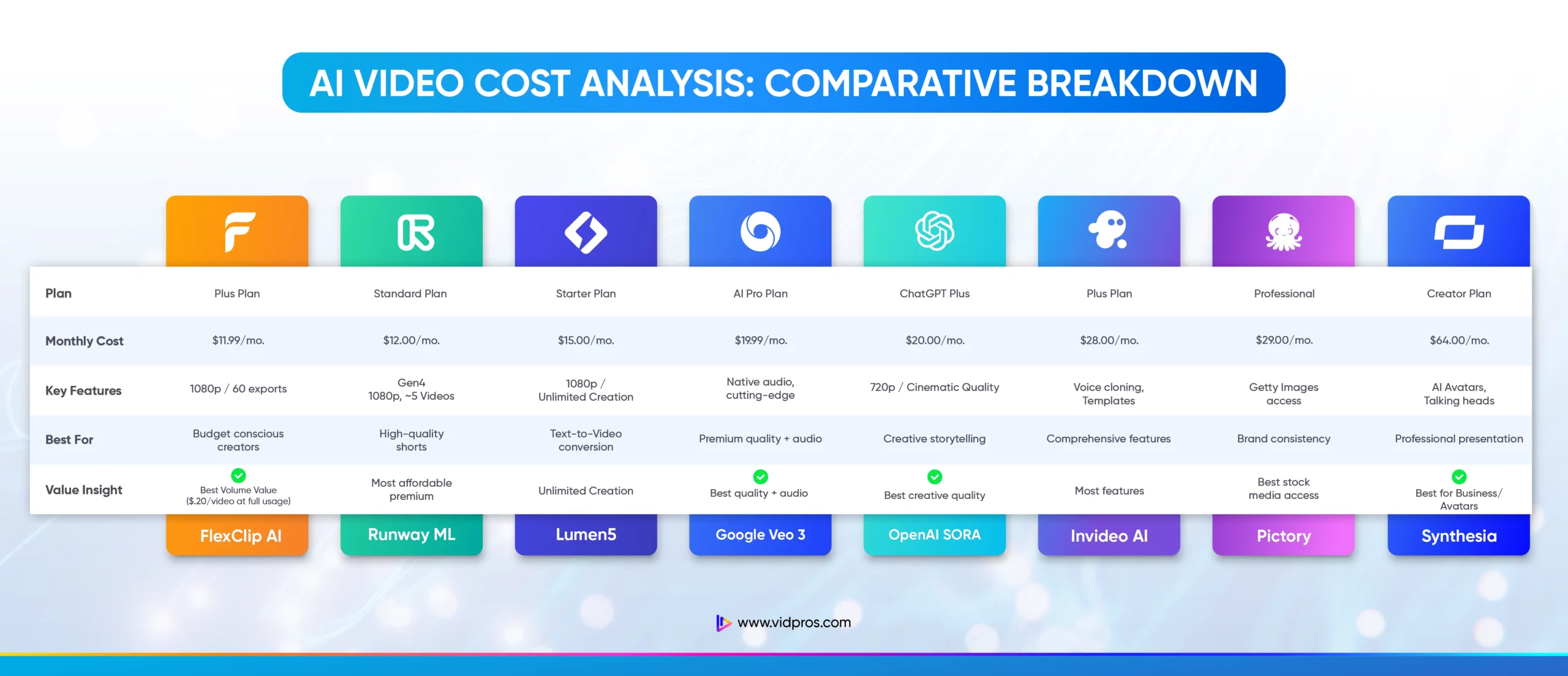
*Cost per minute when using the full monthly allowance
Additional costs and considerations
Before you sign up and choose an AI video creation tool, here are a few things to consider:
Time to learn and use the tools
Each AI video creation tool has its own interface and features, so you’ll need to invest some time in learning how to use it. Some tools, like FlexClip AI and Crayo.ai, are more user-friendly, while others, like Sora and Runway, have a steeper learning curve due to their advanced features.
Don’t forget to factor in time for:
Watching tutorials
Practicing with the tool
Getting to know all the features
Learning new features as tools update (which happens frequently in 2025)
As you get more comfortable, you should explore more advanced features that will impact your productivity.
Extra costs for editing or refinement
While AI tools can produce excellent videos, you may need additional editing video work to get that professional look. It could mean:
Using external software like Adobe Premiere Pro or Final Cut Pro (which have their costs)
Hiring freelance editors or agencies for refinement (which can be expensive)
Buying more stock media if you go over your plan limits
Purchasing additional audio tracks or sound effects
You may also need features not included in your current plan, like higher-resolution exports, longer video lengths, or more templates. Upgrading to higher plans will increase your monthly cost.
New considerations for 2025
API Access Costs: Many tools now offer API integration for businesses, which can add $50-$500/month depending on usage.
Storage and Export Fees: With 4K and longer videos becoming standard, some tools charge extra for premium exports or cloud storage.
Team Collaboration: Multi-user access often costs an additional $10-$25 per user per month.
Subscription vs Pay-Per-Use: Long-term cost implications
Most of the tools we’ve looked at, like Pictory, Synthesia, and the new Veo 3, are subscription-based. These offer predictable monthly costs and unlimited access to features within plan limits, which is great for regular users with consistent video output, but not so suitable for occasional users.
Pay-per-use models are less common among the tools we’ve analyzed, though Runway’s credit system offers some flexibility. They can be more cost-effective for infrequent users, but they can be expensive if you need to create multiple videos quickly.
When deciding between the two, consider your long-term content creation needs. Subscriptions are better for businesses or creators who need to produce content regularly. At the same time, credit-based systems like Runway are better for individuals or small companies with occasional but intensive needs.
Cost Comparison: AI tools vs Traditional methods
To understand the value of AI video creation tools, let’s compare them to traditional video production methods with updated 2025 pricing:
Traditional 1-minute video production costs
Traditional video production costs have increased significantly post-pandemic, varying wildly depending on project complexity, location, talent, and equipment. Here’s a rough breakdown:
Simple corporate videos: $1,200 to $1,500 per minute (increased from $800-$1,000)
Complex projects with special effects or high-profile talent: Can be over $15,000 per minute (up from $10,000)
These costs include:
Scriptwriting
Crew hiring (camera operators, directors)
Equipment rental
Location fees
Post-production editing
Graphics or animations
Stock video footage alone can cost $150 to $400 per clip (increased from $100-$250), so a one-minute video with multiple clips could cost $3,000 or more just for footage.
When AI tools are more cost-effective
AI tools are great in:
High volume production: If you’re a business that needs video content for social media, AI tools like Veo 3, InVideo, and Pictory can help you create multiple videos for $20 to $79 per month.
Limited budget: Tools like FlexClip AI and Crayo.ai offer affordable plans for startups or small businesses to produce high-quality content without high overhead costs.
Time-sensitive projects: AI tools can produce videos in minutes rather than days, which is essential for trending topics or urgent announcements.
Testing and iteration: Create multiple versions quickly to test what resonates with your audience.
When traditional methods might be more cost-effective
Despite the benefits of AI tools, traditional methods still have their place:
High production quality: Investing in commercials or corporate branding videos that require cinematic quality, professional equipment, and skilled personnel might be worth it.
Custom content: Projects that require highly customized content, specific locations, or complex emotional storytelling benefit from human creativity and direction.
Long-term investment in skills: Companies investing in staff training for video production might find it more cost-effective to reduce their reliance on external production teams in the long run.
Brand flagship content: Hero videos that represent your brand for years justify higher investment.
The value of human expertise
While AI video editing offers significant cost and speed benefits, they have some limitations:
Lack of emotional nuance: AI can’t convey complex emotions and storytelling subtleties, resulting in videos that feel flat or lack emotional depth during the editing process.
Generic content: Using templates and stock footage can result in videos that look similar or generic, diluting your brand.
Limited creative flexibility: AI won’t adapt to unique creative visions or last-minute changes, while human editors have critical and creative thinking skills.
Quality control: AI-generated video clips may require additional oversight to meet quality standards, often necessitating human intervention to refine them.
That’s where professional editing can help AI content:
Refine content: Editors can adjust pacing, transitions, and overall flow to produce a polished finish.
Customization and branding: Human editors can tailor videos to brand guidelines, add custom graphics, color grade, and add brand elements.
Creative input: Editors bring experience and creativity to turn basic AI-generated videos into compelling stories.
Quality control: Editors check before content goes to market to ensure quality standards are met.
Fractional video editing: A cost-effective solution
If you want to balance AI efficiency and human expertise, fractional video editing services like Vidpros might be the answer. This way, you can:
Get professional editing talent without the cost of full-time staff.
Scale your video production according to demand.
Boost engagement and brand perception, and potentially better ROI from your video marketing.
Combine AI generation speed with human polish.
Capping off
AI video creation tools are a cost-effective solution for businesses that need to produce video content regularly. With exciting new options like Google Veo 3 and OpenAI Sora joining established players, the landscape has never been more competitive or accessible.
By understanding the pricing models, hidden costs, and limitations of both new and established tools, you can make an informed decision that balances your budget with your quality requirements.
The key to video marketing isn’t just producing content fast and cheap– it’s about creating content that resonates with your audience and drives results for your business.
Whether you use AI video editing tools, traditional methods, or a combination of both, the most important thing is that your videos communicate your message and achieve your marketing goals. With 2025’s new tools offering unprecedented quality at accessible prices, there’s never been a better time to incorporate AI video creation into your marketing strategy.