Searching for how much do video editors make can feel oddly stressful.
Because it’s never just curiosity, it’s usually tied to a decision. Do you take the job? Do you raise your rates? Do you switch niches? Or are you about to spend months improving your video editing skills, and you want to know if the money on the other side is actually worth it?
Here’s the headline answer: in the U.S., a typical video editor’s pay number lands in the low-to-mid $70k range per year, but the real figure depends on your role, your work experience, and how you get paid. We work with editors every day at Vidpros, and the pay gap usually comes down to trust, speed, and results, not just fancy transitions.
Now let’s get you clean, current numbers without turning this into a “everything about editing” rabbit hole.
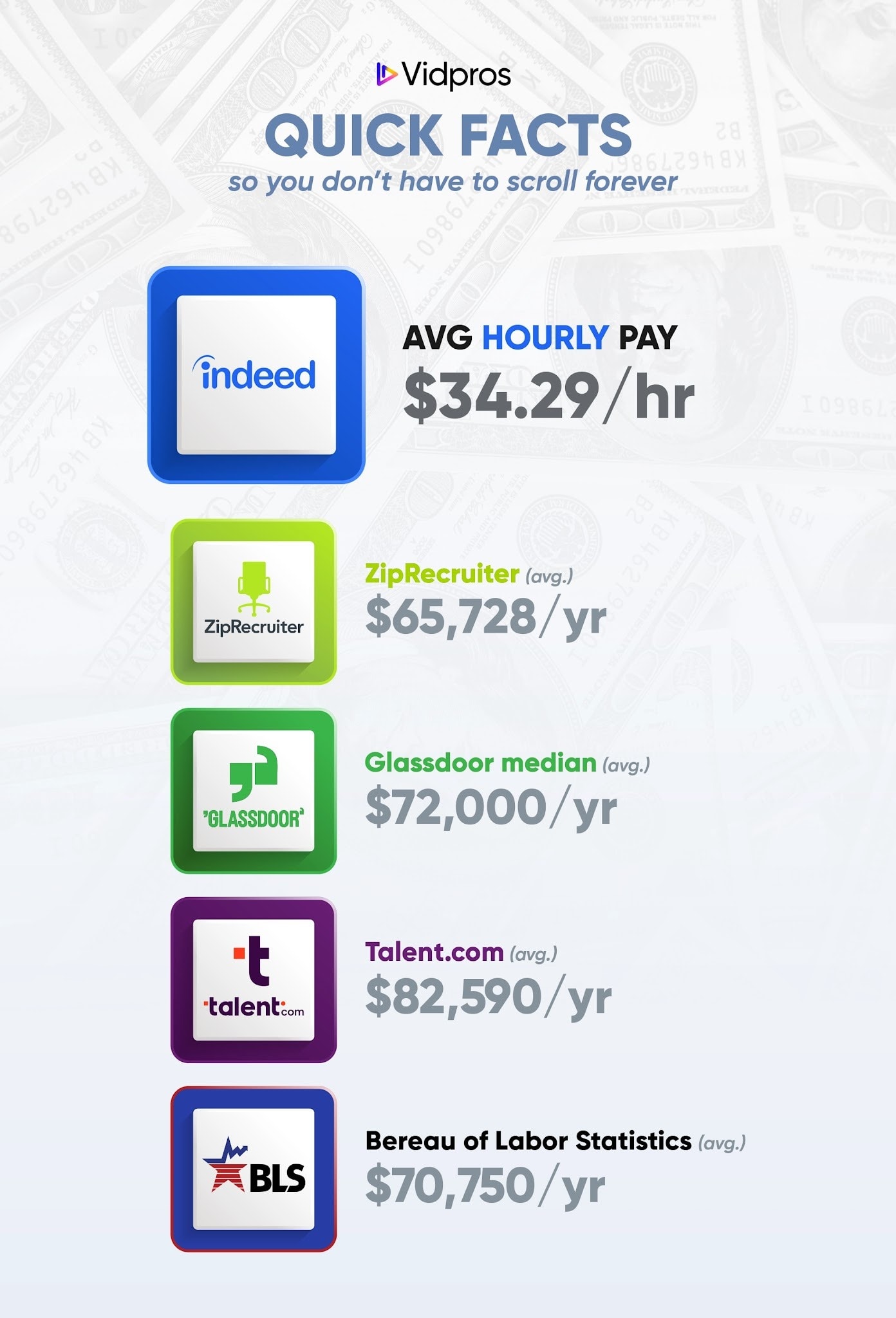
Quick Facts (so you don’t have to scroll forever)
If you want the short answer first, here it is:
Average hourly pay (U.S., job postings): $34.29/hour (Indeed)
ZipRecruiter average (U.S.): $65,728/year (ZipRecruiter)
Glassdoor median total pay (U.S.): $72K/year, with a “most likely” range of $54K to $96K (Glassdoor)
Talent.com average (U.S., 2026 page): $82,590/year (entry $54,125, high $140,280) (Talent.com)
BLS median pay (2024, Film and Video Editors and Camera Operators): $70,570/year (Bureau of Labor Statistics)
How much do video editors make per year?
There isn’t a single “perfect” video editor salary figure because the job title varies widely.
Some people are editing YouTube videos and Instagram Reels. Others are cutting music videos, doing heavier post-production, or working inside bigger production companies with producers and directors giving detailed notes.
So here’s the practical way to answer it.
A clean “one-number” estimate (based on multiple sources)
To keep things simple, I averaged the latest headline numbers from Indeed (hourly annualized), Glassdoor, ZipRecruiter, Talent.com, and BLS.
Cross-source average: $72,442/year
That’s not “the truth for everyone.” It’s a solid midpoint for expectations.
Quick note on the math: Indeed reports hourly pay, so I converted $34.29/hour to annual using a standard 2,080-hour work year.
A realistic salary range (what most people actually see)
If you’re trying to place yourself on the spectrum, percentiles help more than averages.
An average salary is basically one blended number. Useful for a quick gut-check, sure. But it can also hide a lot.
Video editing pay is spread out because the work is spread out. Entry-level editors, mid-level editors, and highly specialized editors all get lumped into the same bucket, and then you get one “average” that doesn’t really describe where you sit.
Percentiles show you the ladder instead:
25th percentile: You’re earning more than about 25% of people in the role, and less than the other 75%. This often lines up with newer editors, smaller markets, or simpler editing work.
50th percentile (median): The true middle. Half of editors make more, half make less.
75th percentile: You’re earning more than about 75% of editors. This is where you start seeing specialization, stronger client relationships, or bigger-stakes projects.
90th percentile: Closer to “top earners.” Often includes leads, editors in higher-paying industries, or people with niche clients who happily pay extra for.
My take: if you’re trying to figure out your next move, percentiles give you a clearer target than averages. It’s easier to say, “I’m around the 50th, how do I get to the 75th?” than chasing one generic number.
ZipRecruiter shows most salaries in this band:
$44,500 (25th percentile) to $82,500 (75th percentile)
with top earners at $101,000 (90th percentile)
Glassdoor’s “most likely range” is:
$54K to $96K, with a $72K median total pay
So if you want a plain-English takeaway:
Lower end: roughly mid $40Ks to mid $50Ks
Common band: roughly mid $50Ks to mid $90Ks
Higher end: $100K+, usually with specialization, seniority, or higher-stakes work
Video editor hourly rate (employee pay)
An hourly rate is the quickest way to sanity-check a job. So, how much do video editors make in an hour?
Indeed’s U.S. figure is:
$34.29/hour average
Low: $14.81, High: $79.37
based on 1.5K salaries from job postings over the past 36 months
My take: the “high” end usually shows up when the role quietly includes more than editing. Things like managing the whole workflow, polishing audio, building motion graphics, handling revisions, and being the person the team relies on when deadlines get tight.
Alright. Streaming platforms like Twitch also hire editors. Freelance work differs, so let’s switch gears.
Freelance video editor rates (what editors charge)
Freelance rates can look “all over the place,” and honestly, that’s because the projects are all over the place.
Upwork’s pricing guide lays out a clean ladder:
Entry-level: $15 to $30 per hour
Intermediate: $30 to $60 per hour
Expert: $60 to $150+ per hour
One quick reality check (from someone who’s seen a lot of editing workflows): freelancers don’t usually bill 40 hours every week.
There’s always time spent on:
project review and revisions
organizing footage, shots, audio, and assets
client communication
admin and follow-ups
lining up the next job
So if you’re comparing freelance video editor rates to salary, don’t just focus on the hourly rate. Focus on how many billable hours you can reliably get.
What affects how much a video editor makes?
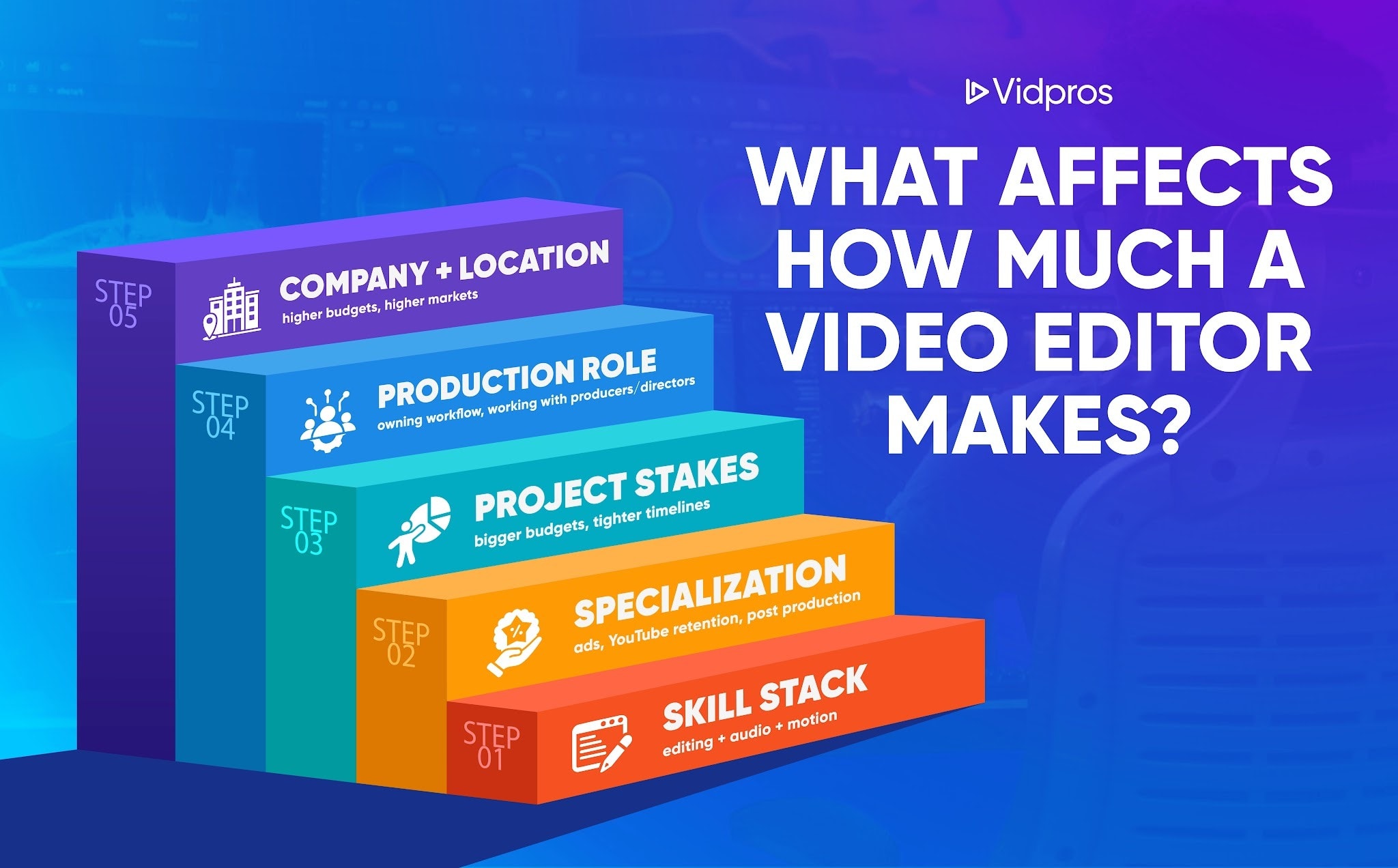
This part matters because two editors can use the same editing software and still earn wildly different pay.
Here are the biggest levers, without the fluff.
Skill stack (what you can do with the tools)
Video editing software is table stakes. Premiere, Resolve, After Effects, Final Cut, Avid, whatever.
What tends to raise pay is what you can consistently create:
pacing that holds attention
story structure from messy footage
clean audio that doesn’t sound like it was recorded in a hallway
tasteful special effects or animation when it actually helps the video
That’s the difference between “I edit” and “I make this content perform.”
Industry and project stakes
A simple internal training video is different from a high-pressure entertainment or performance-driven project.
BLS also lists the occupation’s quick facts and job outlook in one place, which is helpful context when you’re thinking about demand over the next decade.
Where you sit in production
Pay often climbs when you’re doing more than cutting.
If you’re coordinating post-production deliverables, handling producer feedback, or working closely with directors, you’re adding value that goes beyond the timeline.
Company and location
Some companies simply pay a higher video editor hourly rate.
Indeed literally lists “highest paying companies” based on job postings data (for example: Verkada, Netflix, Electronic Arts). I wouldn’t build your whole career plan around those names, but it’s a real signal that pay can jump depending on the company and role.
Save More on Vidpros’s Video Editor Salary Offer
If you’re a business owner or marketer reading this, the salary question ‘how much do video editors make’ usually turns into a time question pretty quickly.
A full-time hire can be great, but it also comes with overhead and management. That’s why a time-based editing model can feel like a bargain.
Vidpros pricing is straightforward:
$1,000/month for 2 hours per workday with a dedicated editor (part-time)
$4,000/month for 8 hours/day (full-time)
And if you want the lowest-friction way to try it first, Vidpros has a $100 trial for 1 week of professional video editing. You can choose:
10 short-form videos, or
1 long-form video
If you’ve been stuck doing the editing yourself, it’s a pretty clean way to get time back without turning your week into a production meeting.