You may have a good Camera. Decent mics. A great story. But the Interview could still look like it was filmed at home.
It’s not always because of the equipment. Often, the issue is how high the Camera is positioned. Where the Camera is placed relative to the Subject. How closely the second Camera mirrors the first. Each of these can quietly lower the overall quality of the Interview, and you’ll likely notice it too late – while trying to fix issues during the edit process at 11 pm.
I’ve seen this over and over again on our end. We’re always being asked by clients at Vidpros to “make this look better.” Nine times out of 10, the solution isn’t going to be a plugin or LUT. It’s going to be the Angles that were used.
Here’s a play-by-play that applies regardless if you’re filming a testimonial, podcast, founder Interview or just plain old talking head style YouTube videos. This is a standard setup you can use:
The Short Version
Most interviews that look expensive follow three simple principles:
- The Camera is at their eye level or slightly higher
- They sit slightly off center to allow room to glance into the Camera
- Cuts are made between shots that are dramatically different
Medium shot with one Camera? Done.
With two cameras? Here’s what works almost every time:
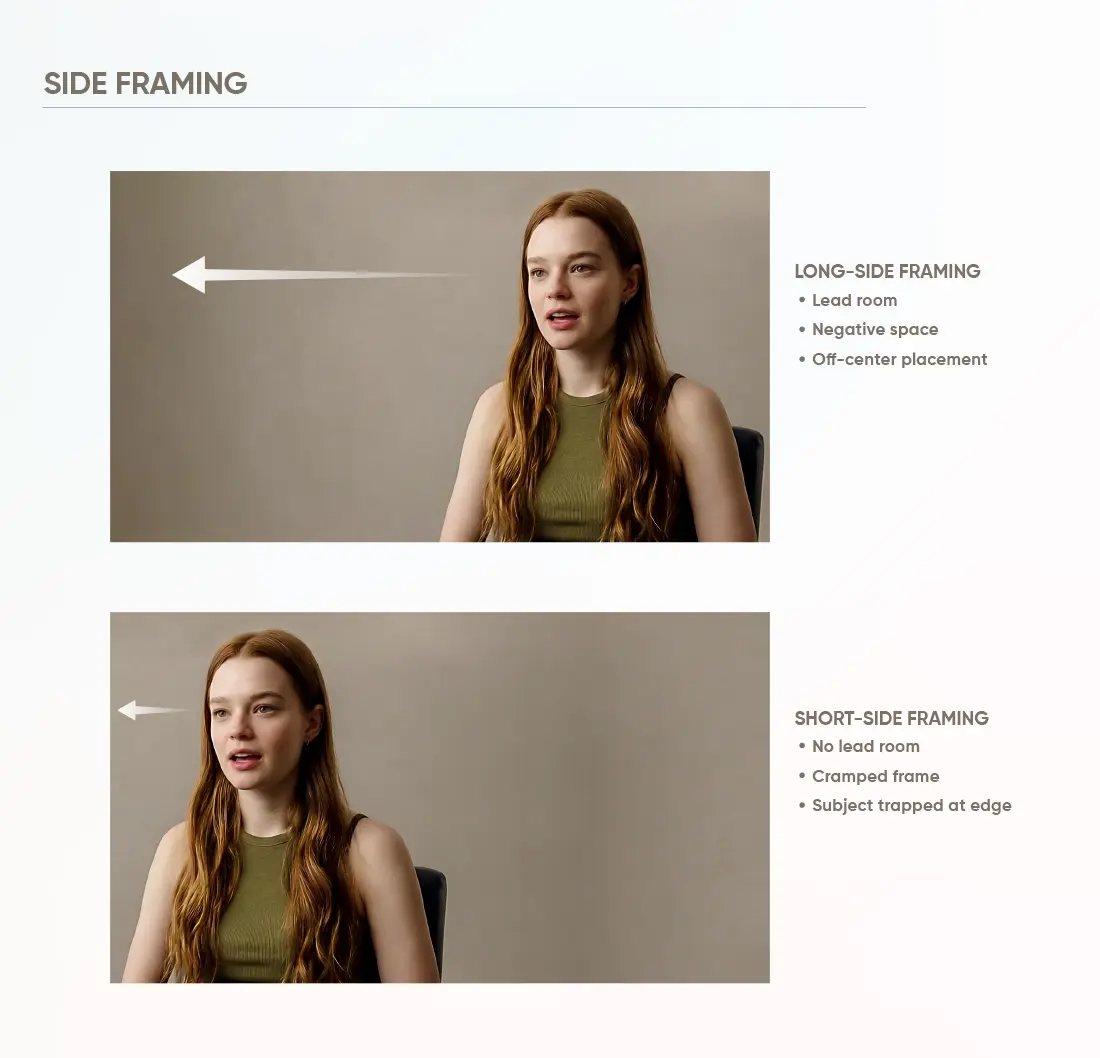
- A-cam: medium shot at eye-level (long-side framing)
- B-cam: tightly framed (1/2 or 3/4), same side of the room as a-camera
That’s it. That’s the exact format of every single “high-end” Interview I’ve ever cut. You don’t need ten different Angles; you need two-three different Angles.
Framing Basics for Interviews
Before we get into tripods, let’s cover some Basics about framing. While a well-framed image that has poor framing is still poorly shot, and conversely, a poorly-framed image with a basic frame is still going to read as professional.
Long-Side Look
The most common Interview frame is off-center:
- Subject sits on one side of the screen
- Space open on other side of the screen that they are looking towards
I would argue that this negative space is more important than most people realize. It creates balance in the frame and visually communicates to viewers “this is a conversation,” not a hostage video.
Right or Left Eye Line
When they look right, create space to the right. When they look left, create space to the left. Obvious, but still gets done wrong often.
Three Framing Mistakes I See Weekly
Quick scan before you start recording behind your Camera:
- Headroom. Either too much, they shrink. Or too little, they look crammed.
- Lead room. Do not have them trapped at the edges of frame when they are looking toward that direction.
- Eyeline. Upper third of the screen, shoot for the eyes. Not a law. Safe place to start.
Plan for Captions

If you already know that the Interview will be broken up into smaller shorts, plan ahead for captions now. You’ll want to make sure there is plenty of space for:
- Captions
- Name plates
- Call-outs
Do not frame your shot so tightly that captions fall on top of their mouths. Trust me, future-you will hate yourself.
Camera Position (Keep It Simple)
Camera position is primarily based on comfort. Viewers experience comfort when your Subject appears natural in front of the Camera, their eye-line follows naturally through the shot, and the shot does not resemble a surveillance feed.

Height & Distance
Simple by design:
- Height: lens is at eye level or slightly above
- Distance: back the Camera up. Avoid shoving a wide-angle lens into someone’s face.
Low Angles Are Brutal
Exaggerates the chin. Covers someone’s nostrils who did not ask for it. Turns a CEO into a Bond villain.
If your space is limited and you’re thinking of using a wide-angle lens and pushing it close to your Subject, please do not. Those two combined distort faces in ways that cannot be unseen.
Add Depth (This One Thing Will Make Everything Look More Professional)
Pull your Subject away from the wall. No matter how far, any amount adds separation. Separation = premium. Separation = why a shallow DOF looks natural rather than forced.
If you change only one thing today, change this.
How Far Away Is the Interviewer?
I would bet money most “poorly angled” footage is actually due to a poor eyeline.
When the interviewer moves off center, so does the Subject’s gaze, and then your guest looks like he/she is talking to a house plant.
Fixes:
- Park the interviewer directly next to the lens
- Do not let them shift mid-shot
Shooting Solo? Add an Eyeline Target
Stick a sticker, printout with your face or even your phone next to the lens as an eyeline reference point. Ridiculous-looking? Works every time.
Bad Light Makes Bad Angles Look Worse
You can film and frame perfectly and yet get terrible, unflattering footage if the light is bad.
Easy Key & Fill Lighting
Two lights. Two jobs.
1) Key – main light that creates the shape of the face.
2) Fill – softens the area on the shadowed side so the person looks normal and not like they are being interrogated.
The setup:
- Key light positioned slightly off to one side of the Camera, roughly at eye level or just a bit above.
- Fill positioned on the opposite side, softer and less bright than the key.
- You want a soft shape on the person’s face. Harsh, bright light turns one side into a cave.
Fast check: is the area under the eyes and nose of the person shaded sharply? Then your key is either too strong, too high or too far to one side.
C-Stands Are Nice to Have
Using a c-stand is nice because you can position your light precisely and then forget about it. Using a standard light stand is okay too. Don’t overthink this part.
Set and Forget Your Camera Settings
This is another place where interviews start to deviate without anyone realizing it. Lock down the basic parameters of your Camera (the ones that won’t shift while filming):
- Exposure
- Shutter speed
- White balance
Why Auto Modes Suck at Interviews
While auto-modes are great for vlog-style videos, they’re horrible for interviews. Why? They tend to switch modes mid-sentence (while you’re talking). This means your color scheme will now be out of sync across edits. Unsynced “looks” are difficult to fix in post-production. Glance at a monitor or the Camera screen before you begin recording. 30 seconds of habit equals hours saved in post.
Best Camera Angle for an Interview (Your A-Cam)
The best angle is simply the one you can remain seated for throughout the entire interview. Flattering. Stable. Simple to cut around.

Safe Formula
To ensure flattering and stable shots follow these guidelines:
- Eye level (or slightly above)
- Medium or medium close shot
- Long-side composition (off-center with some room to breathe)
- Sit next to the lens
These are good formulas for: testimonials, podcasts, founder interviews etc. – corporate style interviews.
Straightforward Opinion: Unless You Know What Style You Want, Go Old School
Unless you know what style you want to go for, don’t try to be smart with your A-Camera. The B-Camera is for all of those cool Angles you were planning on using. Your A-Camera should remain boring so you have something to build your edit from.
Choosing Lenses Without Getting Lost in the Rabbit Hole
It’s unnecessary to memorize your focal length chart. All you need to do is remember:
- Wide lens + close subject = distorted face
- Slightly tighter lens + back up more than half way down the frame = natural looking faces
If you find yourself debating whether to choose: “close + wide” or “back up + zoom”, always choose option number 2.
Locking Down Exposure and White Balance
For the same reason we discussed earlier: don’t let the Camera chase after how much light is coming in through a window during filming. You’ll appreciate this tip when you’re editing multiple answers and they all match.
Three or More Angles
Interviews shot podcast-style have made multi-camera setups seem normal. You do not need a Joe Rogan type setting. A clean 3-camera setup will provide a full episode.
The Basic 3-Camera Setup
- Wide master with both individuals on screen
- Close-up of the host (or Guest)
- Close-up of the Guest (or host)
The Wide shot provides your safety net. If either individual has a long answer, or if they make an uncomfortable laugh, adjust their microphone, etc., this allows you to capture all these uncooperative moments with your Wide shot.
In addition to the above Angles, you may choose to incorporate additional Angles as desired. However, begin with three Angles and create them with quality in mind. There is no substitute for creating high-quality images from three camera Angles than there is for capturing poorly framed images from seven.
Shot Menu You May Choose From
After locking down your primary setup, you are now able to select and add specific Angles to your interviews. At this point your interviews will begin to exhibit a style; the interview is no longer just “the camera pointed at someone.”

Wide Master
Reset frames and transition scenes. Provides long-answer coverage. Scene context. Safety coverage.
Medium
Workhorse. Is friendly. Has readability. Captures hand movement yet does not appear as though the Subject is far away.
Tight Close-Up
Emotional moments occur here. Use this angle when an expression is important – a story, a reaction, a key quote.
Profile or 3/4 Profile
Provides variety quickly. Documentaries utilize this angle often. Useful in breaking up large blocks of time spent by the Subject talking when b-roll is limited.
Over-the-Shoulder (OTS)
Creates a conversational atmosphere. Utilize this angle sparingly. Adding one or two OTS moments creates interest within the edit while preventing the edit from appearing chaotic.
Most Common Errors That Will Become Obvious
You know your footage is “almost good,” however you cannot pinpoint why. In most cases it boils down to one of the following:

Low Camera Angle
Disrupts facial features, creates an odd sense of power. Increase the height of your tripod so that when the Subject sits, the lens is at eye level.
Wide and Close
Distorts the subject’s face. Move the second camera back, tighten your lens.
B-Cam Too Close to A-Cam
Creates a glitchy appearance to cuts. Create a distinctively different image from the secondary angle – tighter, more angular, smaller or larger frame size.
Crossing the Line
Makes it appear as though the Subject is flipping direction. All cameras should remain on the same side of the 180-degree line.
Severe Shadows
Even a great angle loses its appeal due to poor lighting conditions. Lighten the key, increase fill lights, increase camera height.
Next Interview: Better Editing
When you get the correct Angles established, all subsequent aspects become easier. Your shots will look better. Your cuts will feel smoother. Your shorts will edit quicker since you’ve incorporated variety into each shot.
If you are consistently filming interviews, and would prefer not to waste your weekends in Avid Media Composer, Vidpros can take your raw footage and produce a finished long-form video edit along with short-form cutdown versions that maintain pace.
The easiest method to test our services is through our $100 trial package which includes one week of professional editing with sufficient material to produce ten short-form video clips or one long-form interview cut.
We will send you a sample interview clip and return it to you with some camera placement suggestions for your next interview shoot along with an edited version of the original footage. I am confident you will notice the improvement quickly.